Android 16’s New Updates Make Your Phone Smarter Than Ever
Google has dropped fresh Android 16 features, and this time the update feels bigger and snappier. The new release aims to make your phone smarter, cleaner and more personal. It also marks a shift away from the old once-a-year update cycle. Now, Android 16 will roll out features more often, giving users new tools as soon as they’re ready.
Smarter Tools to Keep Notifications Under Control
Notifications crowd your screen every day. Therefore, Android 16 adds new AI-powered tools to handle the mess.
AI notification summaries now condense long chats and bulky messages. They give quick context without forcing you to scroll.
Additionally, a new notification organizer filters low-priority alerts. It quietly groups promotions, marketing pushes and other noise, letting important updates stand out. As a result, users get fewer interruptions and more clarity.
More Ways to Personalize Your Android Experience
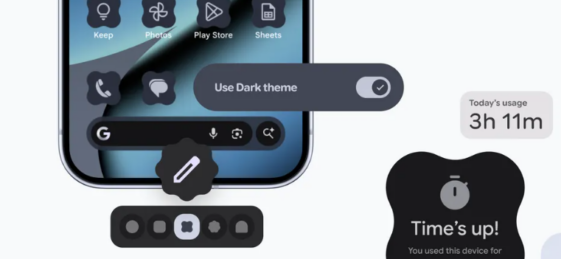
Android 16 finally brings deeper design control. Users can now choose custom icon shapes to match their preferred style.
The update also expands themed icons across more apps. This creates a cleaner and more consistent look on the home screen.
Furthermore, dark theme gets a major boost. It can now darken most bright apps even if they lack native dark mode. This helps save battery and reduces eye strain during late-night scrolling.
Stronger Parental Controls for Safer Device Use
Parents get a major upgrade too. Android 16 introduces Parental Controls directly inside Settings. Everything sits behind a simple PIN, making setup quick and secure.
Parents can set daily screen time, control app usage or block apps entirely. They can also set downtime schedules to lock the device at night. When limits run out, parents may grant extra minutes with one tap.
The new section also connects easily to Google Family Link, which offers school-time tools, purchase approvals and location alerts.
A More Helpful and More Human Android
Android 16’s new updates focus on simplicity, safety and personalization. With smarter notifications, cleaner visuals and stronger family tools, the update aims to make everyday use smoother and less stressful.