Key Highlights
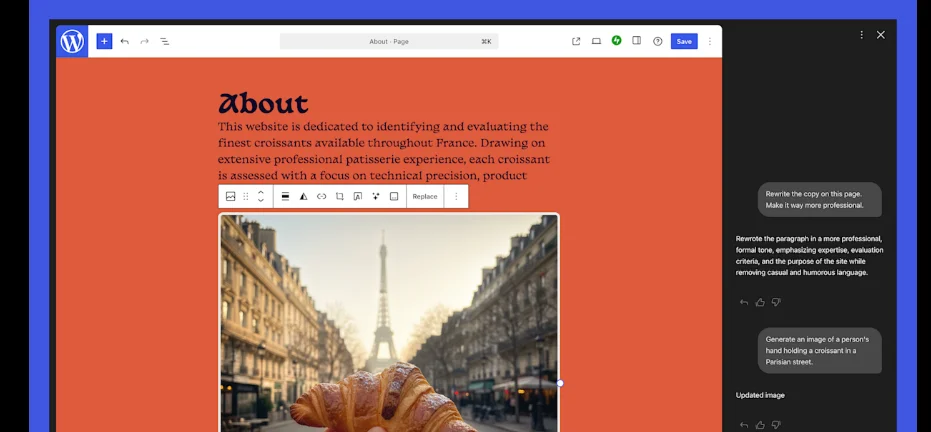
- WordPress.com adds a built-in AI Assistant that works directly inside the editor
- Users can edit layouts, styles, text, and images using natural language
- The tool supports block themes and integrates with the latest WordPress editor
- Image generation and editing use Google Gemini AI models
WordPress.com has launched a new AI Assistant that lets site owners edit content, design, and visuals using simple language. The tool works directly inside the WordPress editor and understands a site’s layout and structure. This matters because it lowers the effort needed to build and update websites, especially for non-technical users.
The AI Assistant is rolling out as an opt-in feature and is available only for sites using block themes.
What is the WordPress AI Assistant?
The new WordPress AI Assistant sits inside the site editor. It allows users to make changes by typing instructions instead of clicking through menus.
You can ask it to adjust layouts, update styles, or refine patterns. Commands do not need to be technical. For example, users can ask to make a section feel more modern, improve spacing, or refresh color choices.
Changes appear live as users work, making the editing process faster and more visual.
How does it change website design and layout?
The assistant can add new pages or sections on command. Users can ask it to add a contact page, insert testimonials, or rearrange sections.
However, this works only with block themes. If a site still uses classic themes, the AI Assistant will not appear in the editor.
This signals WordPress.com’s push toward modern, block-based site building.
Can it write, edit, and fact-check content?
Yes. The WordPress AI Assistant can rewrite text, adjust tone, and translate content into other languages.
It also works as an editor. Inside the block notes editor introduced with WordPress 6.9, users can type “@ai” to call the assistant. It can suggest headlines, check facts, and offer grammar improvements. It also shows links when citing external sources.
This makes collaboration easier for teams working inside WordPress.
How does image generation work?
For visuals, the assistant uses Google Gemini image models. A new “Generate Image” button appears in the Media Library.
Users can create new images or edit existing ones. They can specify aspect ratios and visual styles using text instructions.
This reduces reliance on third-party design tools.
How to enable the WordPress AI Assistant
The feature is optional. Users can enable it by going to their site’s Settings and toggling “Enable AI assistant” under AI tools.
Sites built using the AI website builder will have the assistant enabled by default.
Conclusion
With this update, WordPress.com is embedding AI directly into website creation. By combining writing, design, and image tools in one place, the platform aims to simplify how sites are built and maintained using WordPress.