Key Highlights
- Adobe has launched Quick Cut, a new AI-powered video editing feature inside Firefly
- The tool automatically creates a structured first edit from raw video footage
- Quick Cut is available in beta starting today
- The feature targets creators, reviewers, podcasters, and journalists handling long-form footage
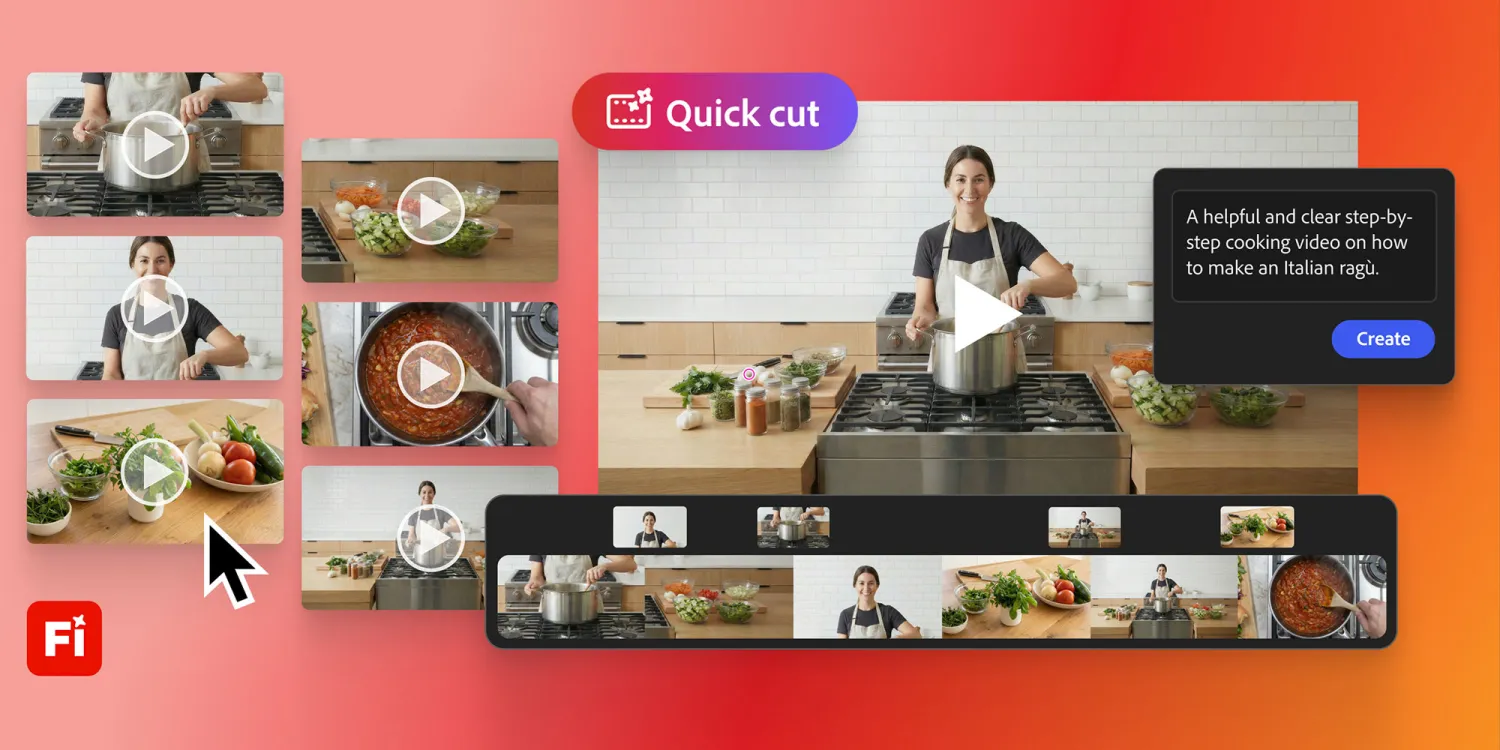
Adobe has introduced a new AI-powered video editing feature called Quick Cut inside Adobe Firefly. The tool automatically assembles raw footage into a structured first edit, helping creators skip hours of manual timeline work. Quick Cut is rolling out in beta today and is designed to speed up early-stage video production.
The update expands Adobe Firefly beyond image and video generation. It positions Firefly as a broader creative workspace where users can move from raw clips to an editable draft in minutes.
What is Quick Cut in Adobe Firefly?
Quick Cut is an AI-assisted editing feature that creates a multi-track video edit from uploaded or generated footage. Users provide context about the content, and Firefly handles the initial assembly.
Instead of starting with an empty timeline, creators receive a ready-to-edit structure. The focus is on reducing time spent stitching clips and increasing time spent shaping the story. Adobe describes Quick Cut as a starting point rather than a finished product. The first edit remains fully editable inside Firefly.
How does Adobe Firefly Quick Cut work?
The workflow is designed to stay simple and fast.
Users upload their raw video footage into Firefly. This can include interviews, product demos, podcasts, or vlog recordings. After uploading, they select the new Quick Cut option.
Firefly then asks for context. Creators can define what the video is about, choose the aspect ratio, set pacing preferences, and optionally upload or generate B-roll footage to support the main clips.
Once this information is provided, Quick Cut analyzes the material and produces a structured, multi-track first edit. The result appears directly inside Firefly, where creators can tweak, refine, and iterate before publishing.
What types of videos can Quick Cut handle?
Adobe says Quick Cut works across several common creator formats.
Product reviewers can upload long uncut recordings from unboxing and testing sessions. The AI follows the narration flow and assembles the footage accordingly.
Podcasters and interview-based creators can use the tool to identify key moments from long recordings. Journalists can quickly surface usable segments from interviews without scrubbing hours of footage.
Vloggers can turn a full day’s recording into a coherent first edit, making the early editing phase less time-consuming.
Why Adobe built Quick Cut now
Video creators are producing more footage than ever. Editing that material remains one of the most time-intensive steps in the workflow.
Adobe says Quick Cut is designed to solve the blank timeline problem. Instead of starting from scratch, creators begin with an organized draft that can be refined further.
According to the company, cutting down time spent on early assembly allows creators to focus more on narrative, pacing, and storytelling decisions.
How Quick Cut fits into Adobe Firefly’s strategy
Firefly has gradually evolved from an image-generation tool into a broader AI-powered creative platform.
By adding Quick Cut, Adobe strengthens Firefly’s position as a central hub for creation, editing, and iteration. The move also keeps Adobe competitive as AI-native platforms push deeper into video editing workflows.
Quick Cut operates entirely within Firefly, reducing the need to move between multiple tools during the early stages of production.
What creators can edit after Quick Cut runs
The AI-generated first cut is not locked or final.
Firefly presents the edit as a multi-track timeline. Creators can rearrange clips, trim segments, replace footage, adjust pacing, and refine transitions. Adobe emphasizes that Quick Cut accelerates the starting point, while creative control remains with the user.
Firefly subscriptions and beta access
Quick Cut is available today as a beta feature inside Firefly.
Adobe is also reminding users that new sign-ups for Firefly Pro and Firefly Premium before March 16 will receive unlimited image and Firefly video generations up to 2K resolution.
This includes access to third-party models integrated into Firefly, such as Google’s Nano Banana Pro and Runway’s Gen-4 Image.
What this means for AI video editing
Quick Cut reflects a broader shift in how AI is used in creative tools. Instead of fully automated outputs, platforms are focusing on assisted workflows.
Adobe’s approach uses AI to handle repetitive groundwork while leaving storytelling and creative judgment to humans. This aligns with how many creators already use AI in production today.
What comes next for Adobe Firefly
Adobe has not shared a timeline for general availability beyond the beta phase. User feedback will likely influence how Quick Cut evolves.
As Firefly continues to expand, more AI-assisted editing features are expected. For now, Adobe Firefly Quick Cut marks a clear step toward faster and more accessible video editing workflows.