Key Highlights
- Google Desktop Mode lets Pixel phones connect to external monitors for a desktop-like interface
- Pixel 8 and newer devices support multi-window productivity with mouse and keyboard
- Pixel Tablet is also receiving a new desktop windowing experience
- The feature builds on Google’s collaboration with Samsung’s DeX ecosystem
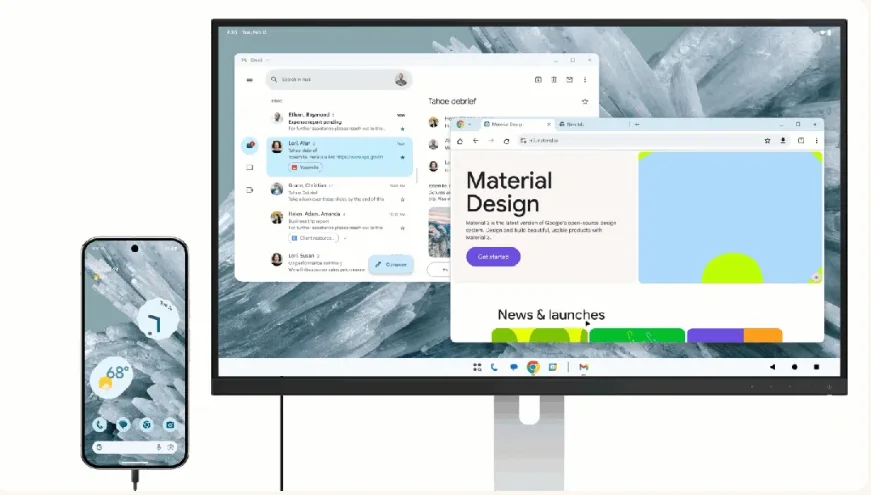
Google is rolling out Google Desktop Mode, a new feature that lets Pixel phones function like a desktop computer when connected to an external monitor. The capability arrives with the March Pixel Feature Drop and supports Pixel 8 and newer devices.
The update allows users to connect their Pixel phones to a monitor using a USB-C cable. Once connected, the phone switches to a desktop-like interface with resizable windows, keyboard and mouse support, and multi-tasking tools.
The feature also extends to foldables and tablets, signaling a larger push by Google to turn Android devices into productivity machines.
What Is Google Desktop Mode?
Google Desktop Mode is a software feature that transforms a Pixel phone or tablet into a desktop-style computing environment. Instead of mirroring the phone screen, the interface adapts to a larger display.
Apps open in resizable windows. Users can arrange them side by side. They can also move them around the screen.
This creates a multi-window workspace similar to what users see on laptops or desktop computers.
The system also supports external input devices. Users can plug in a keyboard and mouse. That combination allows the phone to function more like a traditional PC.
In simple terms, Google Desktop Mode turns a Pixel device into a portable computer when connected to a monitor.
Which Pixel Devices Support Google Desktop Mode?
The new desktop feature works on Pixel 8 and newer devices. That includes several flagship models.
Supported devices include:
- Pixel 8 and later Pixel phones
- Pixel 9 Pro Fold
- Pixel 10 Pro Fold
Google is also bringing a related desktop windowing experience to the Pixel Tablet.
For tablets, the feature focuses on multitasking. Users can arrange overlapping windows across the display. They can resize apps and organize them in a familiar desktop-like layout.
This brings Android closer to traditional computing environments where multiple apps run simultaneously on larger screens.
How Does the Desktop Experience Work?
The process is straightforward. Users connect a compatible Pixel phone to an external display using a USB-C cable.
Once connected, the interface shifts to a desktop environment.
Instead of the standard phone layout, users see a workspace designed for larger screens. Apps appear in movable windows rather than full-screen mobile views.
The system supports several productivity actions:
- Dragging windows across the display
- Resizing app windows
- Running multiple apps at the same time
- Navigating with a mouse pointer
- Typing with a physical keyboard
This approach allows Pixel devices to behave like compact desktop systems.
Users can edit documents, browse the web, manage files, or run several apps simultaneously without switching back and forth on a small screen.
Why Is Google Building a Desktop Experience for Android?
Google has been experimenting with desktop computing features for Android for months.
The company previewed an early version of the interface last year. At that time, it showed how Android could scale from phones to larger displays.
The goal is clear. Smartphones are becoming powerful enough to handle tasks traditionally done on laptops.
However, the interface must adapt to bigger screens. Desktop mode solves that problem.
Instead of simply mirroring a phone display, Android can reorganize itself into a productivity-focused environment.
This approach also fits a broader industry trend. Many companies now explore ways to merge mobile and desktop computing.
How Does Google Desktop Mode Compare With Samsung DeX?
Samsung introduced DeX years ago as a way to connect Galaxy phones to monitors and create a desktop-like environment.
Google is now building a similar capability directly into Android.
In fact, Google confirmed last year that it is working with Samsung to expand desktop features in Android.
The collaboration suggests that future Android versions could standardize the desktop experience across devices.
For Pixel users, the new mode offers similar benefits to DeX:
- Desktop interface on larger screens
- Support for keyboard and mouse
- Multi-window productivity
However, Google Desktop Mode is tightly integrated with Pixel devices and Android updates.
This could allow Google to refine the feature quickly through future Pixel drops.
Why the Pixel Tablet Is Getting Desktop Windowing
The Pixel Tablet is also receiving new multitasking features.
Google says the tablet will support a desktop-style windowing interface. This allows apps to overlap, resize, and move across the screen.
Tablets often sit between phones and laptops in terms of productivity. Adding desktop windowing could make them more useful for work tasks.
Users will be able to organize multiple apps on the screen simultaneously.
This makes it easier to research, write, or manage tasks without constantly switching apps.
The update also aligns the Pixel Tablet with other productivity-focused tablet systems.
Why Google Desktop Mode Matters for Android’s Future
Android has long supported external displays. But the experience often felt like simple screen mirroring.
Google Desktop Mode moves beyond that.
Instead of mirroring the phone screen, Android adapts to the display and behaves more like a computer operating system.
This shift could unlock several possibilities:
- Phones acting as portable workstations
- Tablets replacing lightweight laptops
- Developers building apps optimized for desktop-style multitasking
As phone processors continue to improve, the idea of a single device handling both mobile and desktop tasks becomes more realistic.
What Comes Next for Pixel Productivity Features?
Google has been steadily expanding Pixel capabilities through Pixel Feature Drops.
These updates introduce software features outside the yearly Android release cycle.
Desktop computing tools may continue to evolve through these updates.
Future improvements could include:
- Better multi-monitor support
- Advanced window management tools
- Improved keyboard shortcuts
- Optimized desktop apps
For now, the arrival of Google Desktop Mode marks an important step toward turning Pixel devices into flexible computing tools.
As Android grows across phones, foldables, and tablets, the new desktop interface signals Google’s broader plan to blur the line between mobile devices and PCs.
In short, Google Desktop Mode may change how Pixel devices are used beyond the phone screen.